
Communications protocol
A simple text-based protocol is used. Commands are sent to the SMD4, checked and executed, and a response returned. Data are buffered on receipt and commands are evaluated and executed on a first in first out basis. Although not a requirement, it is usually easiest to send a command and evaluate the response before sending the next command.
Commands are in the form (Note that angle brackets are shown for clarity only, they are not part of the protocol):
<address prefix><mnemonic>,<argument 1>,<argument 2>,<argument n>…<CR><LF>
And responses are in the form:
<address prefix>,<SFLAGS>,<EFLAGS>,<data 1>,<data 2>,<data n>…<CR><LF>
If the command executed successfully, or:
<address prefix>,<SFLAGS>,<EFLAGS>,<error code><CR><LF>
If the command failed to execute correctly.
Where:
|
Item |
Description |
|
<address prefix> |
Optional prefix included when multiple SMD4s exist on the same |
|
<mnemonic> |
Short sequence of characters representing a command, case insensitive |
|
<argument n> |
Zero or more command arguments |
|
<data n> |
Zero or more response data items |
|
<error code> |
An error code, see section Error Codes. This includes both a number and text description of the error to aid when using the SMD4 via a terminal program. |
|
<SFLAGS> |
Set of flags representing the status of the SMD4, such as the state of the limit inputs or whether the joystick is connected. See section Status Flags |
|
<EFLAGS> |
Set of flags representing the error state of the SMD4, such as invalid mnemonic, or motor over-temperature fault. See 0 |
|
<CR><LF> |
Message terminator; carriage return followed by line-feed (0x0D,0x0A) |
Addressing
This section is only applicable where multiple SMD4s are connected together on the same bus, using the serial interface in either RS232 or RS485 mode. The addressing logic described in this section works for all interfaces, but is redundant for USB and the network interface since those inherently implement addressing.
When multiple SMD4s exist on the same bus, a mechanism is required to allow them to be addressed uniquely or as a group. Likewise, only one device must use the bus at a time otherwise bus contention results when more than one device tries to drive the bus at a time.
This is accomplished via the address prefix, which is the at '@' symbol followed by a numeric address:
- 0 = Broadcast address, all SMD4s execute the command, but no response is sent
- 1 to 247 = Valid
secondaryslave address range. The addressed SMD4 executes the command and returns a response - Any address outside this range is invalid, and the packet is silently ignored
Upon receipt of the first complete packet with an address prefix, the SMD4 enters addressing mode, and behaviour then changes as follows, until restart.
- Malformed packets are silently ignored. This includes any packet that does not include the addressing prefix but that is otherwise valid.
- Broadcast packets are silently parsed and executed. A response is not sent, and as such it cannot be determined whether the command executed successfully without submitting a further query addressed directly to the target SMD4.
- Packets that are otherwise correctly formed but having a target address that does not match that of the SMD4 are silently ignored.
Comma separation
All elements are comma-separated, except for the message terminator which immediately follows the last item. A response is always sent on receipt of a message terminator except where addressing criteria are not met. If an argument was supplied with a command, for example, to set a value, the value set will be returned in the response and serves as an additional confirmation of the command having executed as expected.
Many commands accept a real number argument when the underlying quantity is an integer, or finite set of real numbers. In this case, the supplied value being otherwise acceptable is rounded to the closest integer or real number from the allowed set, and it is this value that is returned in the response.
White space
Additional white space (tabs and spaces) are ignored except where they are surrounded by characters comprising the data item, in which case they will be considered as part of the data item itself.
No data items to return
If there are no data items as part of a response, only the SFLAGS and EFLAGS are returned. If an error occurred, then this will be reflected in the EFLAGS.
Argument types
Arguments may be one or a mix of the following types, depending on the command. Data returned by the SMD4 uses the same types, which are always presented as indicated in the “SMD4 response” column.
|
Type |
Name |
Description |
Example argument values |
|
|
INT |
Integer |
Integer value, with or without sign |
100, -10, +7 |
Sign included for negative values only. E.g. 100, -10 |
|
UINT |
Unsigned integer |
Unsigned integer value, no sign. Hexadecimal representation may also be used, case insensitive |
99, 1000, 0xA74F, 0xd7 |
Numeric format E.g. 100, 200 Except for status and error flags which are returned in upper case 2-byte hexadecimal format, E.g. 0x1234, 0xA4DE |
|
FLOAT |
Real number |
Real number, with or without sign. Scientific format may also be used, case insensitive |
10.23, 100e-3, 100E4, 10 |
Scientific format, with 5 places after the decimal point and a E.g. 1.23000E+04, 5.76159E-10 |
|
STRING |
ASCII string |
ASCII string, consisting of characters 0x20 to 0x7E inclusive |
Abc123 78-%^A |
ASCII string, E.g. “1234 abc”, “10%” |
|
BOOL |
Boolean |
Binary, true/false value |
0, 1 |
E.g. 0, 1 |
Flags
Error flags are reported by the device in hexadecimal format as explained above. E.g. a value of 0x0002 means bit 1 is set (TOPEN), indicating that the device has been disabled due to an open circuit temperature sensor.
Error flags (EFLAGS)
These indicate error conditions and are latching (i.e. remain set even after the error condition that caused them no longer persists). Reset the fault using the clear command, or the reset fault input. The motor is disabled if one or more error flags are set.
|
Bit |
Name |
Description |
|
0 |
Temp Short |
Selected temperature sensor is short-circuited (Not applicable to Thermocouple) |
|
1 |
Temp Open |
Selected temperature sensor is open circuit |
|
2 |
Temp Over |
Selected temperature sensor is reporting temperature > 190 °C and power has been removed from the motor to protect the windings |
|
3 |
Motor Short |
Motor phase to phase or phase to ground short has been detected |
|
4 |
External Disable |
Motor disabled via external input |
|
5 |
Emergency Stop |
Motor disabled via software |
|
6 |
Configuration Error |
Motor configuration is corrupted |
| 7 |
Encoder error |
Encoder fault (applicable only when optional encoder module installed) |
|
8 |
Boost UVLO |
The internal 48 V to 67 V boost circuit is disabled because input voltage has fallen too low. |
|
9 |
SDRAM |
Memory self-test failed. |
|
10-15 |
Reserved |
Reserved, read as ‘0’ |
Status flags (SFLAGS)
|
Bit |
Name |
Description |
|
0 |
Joystick Connected |
Joystick is connected (determined via state of the |
|
1 |
Limit Negative |
Limit input is active (Note that the polarity is configurable, so active can mean high or low signal level) |
|
2 |
Limit Positive |
|
|
3 |
External Enable |
External enable input state |
|
4 |
Ident |
Ident mode is active, green status indicator is flashing to aid in identifying device |
|
5-6 |
Reserved |
Reserved, read as ‘0’ |
|
7 |
Standby |
Motor stationary. Check this bit before performing a function that requires the motor to be stopped first, such as changing mode |
|
8 |
Baking |
Bake mode running |
|
9 |
Target Velocity Reached |
Set when the motor is at target velocity |
|
10 |
Encoder Present |
Encoder module fitted |
|
11 |
Boost Operational |
Internal 48 V to 67 V boost supply is operational |
|
|
|
Set when the hardware boost disable jumper is fitted, preventing the boost supply from operating, see stuff. |
13-15
Reserved
Reserved, read as ‘0’
Error codes
|
Error |
Description |
|
-1 (Stop motor first) |
Several actions, such as changing resolution or operating mode require that the motor is stopped first. Trying to run such a command before the motor has come to a stop and the standby flag in the status register is set will result in this error. |
|
-2 (Argument validation) |
An argument supplied to the command is invalid, for example, it is outside the allowable range. |
|
-3 (Unable to get) |
The command is write-only, read is not valid. This applies to commands such as RUNV where a read would have no meaning. |
|
-5 (Action failed) |
The command failed to execute due to an internal error, for example, the internal flash in which settings are stored has reached the end of life and data cannot be reliably written to it. |
|
-6 (Not possible in mode) |
The command is not applicable to this mode, for example, trying to start bake using RUNB when not in bake mode. |
|
-7 (Not possible when motor disabled) |
The motor is disabled (due to a fault, or external enable) and the command is one that starts motion, for example RUNV. |
|
-101 (Argument type) |
The argument is of the wrong type, for example a non-integer value was given where an integer value was required. |
|
-102 (Argument count) |
The argument count is incorrect, either too few or too many arguments have been supplied. |
|
-103 (Invalid Mnemonic) |
Command mnemonic is not valid |
|
-104 (Packet error) |
Packet is malformed |
Quick reference
General
|
Mnemonic |
Description |
R |
W |
Arguments |
|
|
● |
|
FW
Read the firmware version number
●
CLR
Clear error flags
●
LOAD
Load saved configuration
●
STORE
Store configuration
●
LOADFD
Load factory defaults
●
Identify SMD3 by blinking the status indicator
●
BOOL
Mode of operation
●
●
UINT
Joystick mode
●
●
UINT
Auto switch to Joystick mode on JS connect
●
●
BOOL
External enable used
●
●
BOOL
SYS:CLRFLAGS
ClearReturns ascii table of status and error flags
states
●
Get status and error flags
●
Get human readable summary of status and error flags
●
Read the firmware version number
●
STRING
Load saved configuration
●
Load factory default settings
●
Enter programming mode
●
Restart the SMD4
●
Get motherboard serial number
●
STRING
Get product serial number
●
STRING
Get uptime
●
UINT
Get UUID
●
Command movement
|
Mnemonic |
Description |
R |
W |
Arguments |
|
Move motor velocity mode |
|
● |
STRING |
|
|
Move motor absolute positioning mode |
|
● |
INT |
|
|
Move motor relative positioning mode |
|
● |
INT |
|
Activate bake mode
●
Start home mode procedure
●
STRING
Bring motor to a stop according to the current profile
●
Stop motor in 1 second on full step position independently of the current motion profile
●
Emergency stop. Stops the motor immediately
●
Motor
|
Mnemonic |
Description |
R |
W |
Arguments |
|
Temperature sensor selection, T/C or RTD |
● |
● |
UINT |
|
|
Temperature in °C |
● |
|
|
|
|
Run current in amps |
● |
● |
FLOAT |
|
|
Acceleration current in amps |
● |
● |
FLOAT |
|
|
Hold current in amps |
● |
● |
FLOAT |
|
|
Power down delay in milliseconds |
● |
● |
FLOAT |
|
|
|
● |
● |
FLOAT |
|
|
Freewheel mode |
● |
● |
UINT |
|
|
Resolution |
● |
● |
UINT |
Step/direction mode
●
●
Limit inputs
|
Mnemonic |
Description |
R |
W |
Arguments |
|
Global enable |
● |
● |
BOOL |
|
|
Limit positive (Limit 1) enable |
● |
● |
BOOL |
|
|
Limit negative (Limit 2) enable |
● |
● |
BOOL |
|
|
Limit n polarity (0 for active high, 1 for active low) |
● |
● |
BOOL |
|
|
● |
● |
BOOL |
||
|
Limit polarity for both Limit positive (Limit 1) and negative (Limit 2), (0 for active high, 1 for active low) |
|
● |
BOOL |
|
|
How to stop on limit being triggered |
● |
● |
BOOL |
Profile
|
Mnemonic |
Description |
R |
W |
Arguments |
|
Acceleration in Hz/s |
● |
● |
FLOAT |
|
|
Deceleration in Hz/s |
● |
● |
FLOAT |
|
|
Start frequency in Hz |
● |
● |
FLOAT |
|
|
Stop frequency in Hz |
● |
● |
FLOAT |
|
|
Target step frequency in Hz |
● |
● |
FLOAT |
|
|
Actual frequency in Hz |
● |
|
|
|
|
Actual position in steps |
● |
● |
FLOAT |
|
|
Relative position in steps |
● |
● |
FLOAT |
|
|
Time to stop before moving again in seconds |
● |
● |
FLOAT |
|
|
Full step – micro stepping transition |
● |
● |
FLOAT |
Step/Direction
|
Mnemonic |
Description |
R |
W |
Arguments |
|
Which edges of step input to generate a step on |
● |
● |
UINT |
|
|
Interpolate step input to 256 micro steps |
● |
● |
|
Bake
|
Mnemonic |
Description |
R |
W |
Arguments |
|
Bake temperature setpoint |
● |
● |
UINT |
BAKE:RUN
Start bake
●
BAKE:ELAPSED
Get the elapsed bake time
●
Boost
Mnemonic
Description
R
W
Arguments
Coms
Mnemonic
Description
R
W
Arguments
Command reference
General
SYS:IDENT - Rapidly blinks status indicator (R/W)
Gets or sets a value indicating whether the identify function is enabled. When set to true, the green status light on the front of the product flashes. This can be used to help identify one device amongst several.
|
Query: |
Arguments
The enable state.
|
[0: |
Disable] |
|
1: |
Enable |
Returns
The enable state, as above.
Examples
|
Tx: SYS:IDENT,1<CR><LF> Rx: 0x0000,0x0000,1<CR><LF> Tx: SYS:IDENT<CR><LF> Rx: 0x0000,0x0000,1<CR><LF> |
// Set ident function on
// Query state of ident function
|
SYS:MODE - Choose mode of operation
Gets or sets the operating mode. See section Operating Modes for an explanation of each mode.
Arguments
The operating mode.
|
0: |
Step/direction |
|
1: |
Step/direction triggered velocity
[1:2:
Remote]
2:3:
Joystick
3:4:
Bake
4:5:
Home
Returns
The mode, as above, followed by a space and the name of the mode in brackets.
Remarks
If the motor is moving when attempting to change the mode, a stop motor first error is returned and the mode is unchanged.
Examples
|
Tx: Rx: 0x0000,0x0000,2 (Remote)<CR><LF> Tx: Rx: 0x0000,0x0000,1 (Remote)<CR><LF> |
// Set mode to remote
// Query state of mode
|
SYS:JSMODE – Joystick mode
GetsSet or setsquery the joystick mode. Choose between single step, which allows precise single steps or continuous rotation, or continuous which requires only a single button press to make the motor move.
Arguments
The joystick mode.
|
[0: |
Single step] |
|
1: |
Continuous |
Returns
The mode, as above.
Remarks
Set requires the motor to be in standby, otherwise, a stop motor first error will be returned.
In single step mode, a brief button press (< 0.5 s) will execute one step in that direction, while pressing the button for > 0.5 s will cause the motor to accelerate up to slewing speed and continue to rotate in that direction until the button is released, at which point the motor will decelerate to a stop.
In continuous mode, a brief button press will trigger the motor to accelerate up to slewing speed. A subsequent press of the same button causes it to decelerate to a stop. If, for example, the clockwise button is pressed while the motor is rotating anti-clockwise, the motor will first decelerate to a stop before changing direction.
Examples
|
Tx: Rx: 0x0000,0x0000,1<CR><LF> Tx: Rx: 0x0000,0x0000,1<CR><LF> |
// Set JSMODE to continuous
// Query state of JSMDOE
|
SYS:AUTOJS – Auto switch to joystick mode
GetsSet or setsquery auto switching to joystick mode. When enabled the joystick auto select function. When set to true, the productSMD3 switches automatically to joystick mode automaticallyand whenreverts connectingto athe previous mode on disconnection of the joystick.
Arguments
The enable state.
|
0: |
Disable |
|
[1: |
Enable] |
Returns
The enable state,Enable, as above.
Examples
|
Tx: Rx: 0x0000,0x0000,1<CR><LF> Tx: Rx: 0x0000,0x0000,1<CR><LF> |
//
// Query state of AUTOJS function
|
SYS:EXTEN – External enable usedused?
GetsSet or sets a value indicatingquery whether the external enable signal should be respected. If not using the external enable and it remains disconnected, set to false.used.
Arguments
External enable signal.
|
[0: |
False] |
|
1: |
True |
Returns
True if the external enable signal is used.
Remarks
The external enable input requires a voltage to be applied between SDE COM and EN on the I/O connector which may be inconvenient if you do not wish to use the enable input. In that case, disable the enable input by sending this command with the argument set to false.
Examples
|
Tx: Rx: 0x0000,0x0000,1<CR><LF> Tx: Rx: 0x0000,0x0000,1<CR><LF> |
//
// Query state of EXTEN function
|
Command movement
SYS:CLRRUNV – ClearRun, faults
velocity
ClearCommand allto error flags.
Command:
SYS:CLR<CR><LF>
Examples
Tx: SYS:CLR<CR><LF>
Rx: 0x0000,0x0000<CR><LF>
// Clear errors
SYS:FLAGS – Get status and error flags
Gets status and error flags.
Query:
SYS:FLAGS<CR><LF>
Remarks
None.
Examples
Tx: SYS:FLAGS<CR><LF>
Rx: 0x0000,0x0000,1<CR><LF>
// Get flags
SYS:FLAGSV – Get status and error flags summary
Gets a human readable summary of status and error flags.
Query:
SYS:FLAGSV<CR><LF>
Remarks
None.
Examples
Tx: SYS:FLAGSV<CR><LF>
Rx: 0x088e,0x0000,<CR><LF>
-------Status flags------
[ ]JsCon
[X]LimitNeg
[X]LimitPos
[X]Exten
[ ]Ident
[ ]reserved1
[ ]reserved2
[X]Standby
[ ]Baking
[ ]TargetVelocityReached
[ ]EncoderPresent
[X]BoostOperational
[ ]BoostDisableJumper
[ ]reserved3
[ ]reserved4
[ ]reserved5
-------Error flags-------
[ ]TempShort
[ ]TempOpen
[ ]TempOver
[ ]MotorShort
[ ]ExternalInhibit
[ ]EmergencyStop
[ ]ConfigError
[ ]EncoderError
[ ]BoostUVLO
[ ]reserved1
[ ]reserved2
[ ]reserved3
[ ]reserved4
[ ]reserved5
[ ]reserved6
[ ]reserved7
SYS:FW – Get firmware version
Gets firmware version string.
Query:
SYS:FW<CR><LF>
Returns
Firmware version STRING
Remarks
None.
Examples
Tx: SYS:FW<CR><LF>
Rx: 0x088e,0x0000,24044.12<CR><LF>
// Query
SYS:LOAD – Load last stored settings
Loadmove the lastmotor savesusing configuration.
Command:
SYS:LOAD<CR><LF>
Remarks
None.
Examples
Tx: SYS:LOAD<CR><LF>
Rx: 0x088e,0x0000<CR><LF>
SYS:LOADFD – Load factory default settings
Load the factory default configuration.
Command:
SYS:LOADFD<CR><LF>
Remarks
Use the store command if you want to persist the changes.
Examples
Tx: SYS:LOADFD<CR><LF>
Rx: 0x088e,0x0000<CR><LF>
SYS:PROG – Enter programming mode
Reboot the SMD4 into programming mode. Used by AML device control software to initiate a firmware update. Power cycle to cancel thisvelocity mode.
Remarks
There is no response to this command.
Examples
Tx: SYS:PROG<CR><LF>
SYS:RESET– Restart the SMD4
Reboot the SMD4.
Command:
SYS:RESET<CR><LF>
Remarks
There is no response to this command.
Examples
Tx: SYS:RESET<CR><LF>
SYS:BSN – Get motherboard serial number
Gets the serial number of the motherboard.
Query:
SYS:BSN<CR><LF>
Returns
Motherboard serial number STRING
Remarks
None.
Examples
Tx: SYS:BSN<CR><LF>
Rx: 0x088e,0x0000,1234ABCD<CR><LF>
// Query
SYS:PSN – Get product serial number
Gets the serial number of the product. This matches the serial number label installed on the product.
Query:
SYS:PSN<CR><LF>
Returns
Product serial number STRING
Remarks
None.
Examples
Tx: SYS:PSN<CR><LF>
Rx: 0x088e,0x0000,00000-000<CR><LF>
// Query
SYS:UPTIME – Get uptime
Gets the elapsed time since start up in milliseconds.
Query:
SYS:UPTIME<CR><LF>
Returns
Uptime UINT
Remarks
None.
Examples
Tx: SYS:UPTIME<CR><LF>
Rx: 0x088e,0x0000,10000<CR><LF>
// Query
// Uptime is 10 seconds
SYS:UUID – Get UUID
Gets a unique ID number which is included in the data reported when using SSDP. See SSDP. Not the same as the MAC address.
Query:
SYS:UUID<CR><LF>
Returns
UUID UUID
Remarks
None.
Examples
Tx: SYS:UUID<CR><LF>
Rx: 0x088e,0x0000,f4562fb1-d002-11ee-b3e5-44b7d0c71675<CR><LF>
// Query
Command movement
MOTOR:RUNV – Run, velocity
Start continuous rotation in specified direction.
Command:
MOTOR:RUNV, Direction <CR><LF>
Arguments
Direction:Direction velocity motion.
|
‘+’: |
|
|
‘-’: |
|
Remarks
None.Ensure the profile is set.
Examples
|
Tx: Rx: 0x0000,0x0000<CR><LF> Tx: Rx: 0x0000,0x0000<CR><LF> |
//
// |
MOTOR:RUNA – Run, absolute position
MoveCommand to move the motor to a specifiedan absolute position.position using the positioning mode.
Arguments
|
Minimum: |
- |
|
Maximum: |
|
Remarks
None.Ensure the profile is set.
Examples
|
Tx: Rx: 0x0000,0x0000<CR><LF> Tx: Rx: 0x0000,0x0000<CR><LF> |
//
// |
MOTOR:RUNR - Run, relative position
MoveCommand to move the motor to a specified number of steps, relative toposition using the currentpositioning position.mode.
Arguments
|
Minimum: |
- |
|
Maximum: |
|
Remarks
None.Command requires the motor to be in standby, otherwise, a stop motor first error will be returned. Ensure the profile is set.
Examples
|
Tx: Rx: 0x0000,0x0000,1<CR><LF> Tx: Rx: 0x0000,0x0000,1<CR><LF> |
//
// |
MOTOR:RUNHRUNB -– Run,Run homebake
Initiate a homing sequenceCommand to start the specifiedbake limit.mode.
Remarks
Set mode to bake first. To stop the bake mode send the STOP command.
Examples
Tx: RUNB<CR><LF>
Rx: 0x0000,0x0000<CR><LF>
Tx: STOP<CR><LF>
Rx: 0x0000,0x0000<CR><LF>
// Start bake mode
// Stop bake mode
RUNH – Home to a limit switch
Command to start the home procedure, in which the motor will move in the specified direction until the limit switch for that direction is triggered, at which point a homing procedure is initiated, see section Limits.
Command:
RUN, Direction <CR><LF>
Arguments
Direction:Direction velocity motion.
|
‘+’: |
|
|
‘-’: |
|
Remarks
None.Ensure the profile is set and the mode is Home mode.
Examples
|
Tx: Rx: 0x0000, Tx: Rx: 0x0000, |
//
// |
MOTOR:STOP – Stop motor
StopCommand themotor motor,to deceleratingstop moving according to the current profileprofile.
Remarks
During the deceleration phase that stops the motor, any modifications to the acceleration or deceleration interrupt the stopping phase. Re-send the command to restart the motor stopping phase.
Examples
|
Tx: Rx: 0x0000,0x0000<CR><LF> |
// Stop the motor
|
MOTOR:SSTOP – Stop motor in <=1 s
Decelerates theCommand motor to a stop withinthe motion in 1 second, disregarding the current profile to do so.second.
Remarks
This command does not consider the deceleration set in the profile. Instead, it calculates the deceleration required to stop in 1 second, according to the actual velocity. The motor will stop in a full step position. Steps may be lost if the load requires greater than this duration to stop.
Examples
|
Tx: Rx: 0x0000,0x0000<CR><LF> |
// Stop the motor in 1 seconds
|
MOTOR:ESTOP – Emergency stop
StopCommand motorstops immediately disregarding deceleration profile and disabledisables the motor. ThisNote that this should not be relied on as a safety interlock.
Remarks
The motor may stop on a fractional step position, but this is irrelevant as motor power is removed and the motor will snap to a full step position. Steps may be lost.
Examples
|
Tx: Rx: 0x0000,0x0000<CR><LF> |
// Stop the motor immediately
|
Motor
MOTOR:TSEL – Temperature sensor selection
GetsAML motors can be ordered with a K-Type thermocouple or setsa PT100 RTD. Select the motorcorrect temperatureoption sensorfor type.your motor.
Arguments
Motor temperature sensor type.
|
[0: |
Thermocouple] |
|
1: |
RTD |
Returns
Selected temperature sensor type, as above.
Remarks
ToThe protectdrive will not allow the motor fromto possiblerun damage,unless thea motor is disabled if thefunctioning temperature sensor is faultyconnected or missing. The response is not immediate, and several seconds may elapse between emergence of a fault andto the motorselected beingsensor disabled.connection; be sure to select the correct type.
Examples
|
Tx: Rx: 0x0000,0x0000,0<CR><LF> Tx: Rx: 0x0000,0x0000,0<CR><LF> |
// Select thermocouple sensor
// |
MOTOR:TTMOT – Motor temperature
GetQuery the motor temperature in °C.temperature.
Returns
Motor temperature asin integer°C, inrounded to the nearest 1 °C.
Remarks
The reported temperature is intended only for the purposes of monitoring motor temperature and should not be relied upon for any other purpose within the vacuum system.
Examples
|
Tx: Rx: 0x0000,0x0000,25<CR><LF> |
// // Response is 25 |
MOTOR:IR – Run current
GetsSet or setsquery the motor run current.
Arguments
The motor run current in amps rms.
|
[Default: |
1.044] |
|
Minimum: |
0 |
|
Maximum: |
1.044 |
Returns
The motor run current in amps rms, rounded to the closest multiple of 1.044 A / 31 (approx. 33 mA).
Remarks
Run currentIR must be set equal to or smaller than accelerationIA. current.This Accelerationis currentenforced by the SMD3; IA is automatically adjusted to be equal to run current,IR, if a change to run currentIR makes it greater than acceleration current.IA.
Examples
|
Tx: Rx: 0x0000,0x0000,1.0000E+00<CR><LF> Tx: Rx: 0x0000,0x0000,1.0000E+00<CR><LF> |
// Set run current to
// Query run current
|
MOTOR:IA – Acceleration current
GetsSet or setsquery the motor currentacceleration/deceleration applied during acceleration or deceleration.current.
Arguments
The motor acceleration current in amps rms.
|
[Default: |
1.044] |
|
Minimum: |
0 |
|
Maximum: |
1.044 |
Returns
The motor acceleration current in amps rms, rounded to the closest multiple of 1.044 A / 31 (approx. 33 mA).
Remarks
Acceleration currentIA must be set equal to or greater than runIR. current.The AccelerationSMD3 current iswill not adjustedforce IA to match run currentIR if acceleration currentIA is smaller than run current.IR.
Examples
|
Tx: Rx: 0x0000,0x0000,1.0440E+00<CR><LF> Tx: Rx: 0x0000,0x0000,1.0440E+00<CR><LF> |
// Set acceleration current to 1.044 A
// Query acceleration current
|
MOTOR:IH – Hold current
Set or query the motor hold current. If your application allows it, set MOTOR:PDDEL, MOTOR:IHD and MOTOR:IH to zero in order to reduce run current to zero as quickly as possible after stopping which minimises motor temperature rise.
Arguments
The motor hold current in amps rms.
|
[Default: |
0.1] |
|
Minimum: |
0 |
|
Maximum: |
1.044 |
Returns
The motor hold current in amps rms, rounded to the closest multiple of 1.044 A / 31 (approx. 33 mA).
Examples
|
Tx: Rx: 0x0000,0x0000,5.0000E-01<CR><LF> Tx: Rx: 0x0000,0x0000,5.0000E-01<CR><LF> |
// Set hold current to 0.
// Query hold current
|
MOTOR:PDDEL – Power down delay
GetsSet or setsquery the delay time in seconds between stand stillstandstill occurring and the motor current being reduced from the acceleration current to the hold current. The range is 0 to 5.5 seconds, with approximately 8 bit / 20 ms resolution. See also DelayPerCurrentReductionStep.
Refer to Figure 1. If your application allows it, set MOTOR:PDDEL, MOTOR:IHD and MOTOR:IH to zero in order to reduce run current to zero as quickly as possible after stopping which minimises motor temperature rise.
Arguments
The power-down delay in seconds.milliseconds.
|
[Default: |
0] |
|
Minimum: |
0 |
|
Maximum: |
|
Returns
The power-down delay rounded to the closest settable value.
Examples
|
Tx: Rx: 0x0000,0x0000,1. Tx: Rx: 0x0000,0x0000, 1. |
// Set PDDEL to 100 ms
// Query PDDEL
|
MOTOR:IHD – Delay per currentCurrent reduction stepdelay
GetsSet or setsquery the delay in seconds per current reduction step that occurs when run current is reduced to hold current. Non-zero values result in a smooth reduction in current which reduces the chance of a jerk upon power down. The range is 0 to 328 ms, with a resolution of 4 bits or approx. 20 ms. Current setting has a resolution of 5 bits, or 32 steps, and consequently the current reduction process will only have as many steps as exist between the configured run and hold current. See also MOTOR:PDDEL.
See Figure 1. If your application allows it, set MOTOR:PDDEL, MOTOR:IHD and MOTOR:IH to zero in order to reduce run current to zero as quickly as possible after stopping which minimises motor temperature rise.
Arguments
The delay per current reduction step in seconds.milliseconds.
|
[Default: |
0] |
|
Minimum: |
0 |
|
Maximum: |
|
Returns
The delay per current reduction step in seconds.step.
Remarks
See also section Going to standby
Examples
|
Tx: Rx: 0x0000,0x0000,3. Tx: Rx: 0x0000,0x0000,3. |
// Set IHD to
// Query IHD
|
MOTOR:F – Freewheel mode
GetsSet or setsquery the freewheel mode. ForSet maximumthe option to use passive braking useor phasesfreewheeling shorted. Use freewheel to electrically disconnectwhen the motor andis allowin itstandby. toThis freewheel.feature Hold current mustcan be setenabled towhen zero'IH' foris this0. The desired option to work.
The chosen mode becomes active after a time period specified by ‘PDDEL’ and ‘IHD’
Arguments
The freewheel mode:
|
0: |
Normal |
|
1: |
Freewheel |
|
[2: |
Phases shorted to GND] |
Returns
The freewheel mode selection, as above.
Remarks
Use the freewheel mode to allow the motor shaft to spin freely when the motor current is zero. The phases shorted to GND option supplies no power to the motor, but by shorting the phases together a holding torque is produced, and the motor shaft offers considerable resistance to movement. This is enough in many applications to remove the need for any holding current, with the benefit that no heat is generated because the motor phases are not energised.
Examples
|
Tx: Rx: 0x0000,0x0000,1<CR><LF> Tx: Rx: 0x0000,0x0000,1<CR><LF> |
// Set F to freewheel
// Query state of F
|
MOTOR:RES - Resolution
GetsSet or setsquery the microstep resolution. Although the drive may only stop on full step positions in all modes except step/direction, microstepping is still desirable as it reduces resonances for slow movements. Note that full step resolution is always used above a specified stepping rate, regardless of the resolution set here, see command [THIGH].
Arguments
The microstep resolution as an integer.
|
[Default: |
256] |
|
Possible values: |
8, 16, 32, 64, 128, 256 |
Returns
The microstep resolution, as above.
Remarks
MotorQuery mustis beapplicable any time, Set requires the motor in standby to set the resolution.condition.
The resolution applies globally, including for the step/direction interface. Each step on the step/direction interface generates a 1/8, 1/16, 1/32 etc step according to the resolution set here.
Above a configurable step frequency, the drive switches from the microstepping resolution specified here to full step mode in any case. See section THIGH
Examples
|
Tx: Rx: 0x0000,0x0000,256<CR><LF> Tx: Rx: 0x0000,0x0000,256<CR><LF> |
// Set resolution to 256
// Query resolution
|
MOTOR:SDMODE - Step/direction mode
Gets of sets the step/direction mode. In normal mode, edges on the step input generate steps according to the edge setting, see <edge>. In triggered mode, continuous motion is triggered by an edge on the step input; this is akin to how continuous mode works for the joystick, see <joystick continuous mode>
Command:
MOTOR:SDMODE, Mode<CR><LF>
Query:
MOTOR:SDMODE<CR><LF>
Arguments
Mode
ENUM
Mode
[0:
Normal]
1:
Triggered
Returns
Mode ENUM
Remarks
None.
Examples
Tx: MOTOR:SDMODE,0<CR><LF>
Rx: 0x0000,0x0000,0<CR><LF>
// Set mode 0, normal
Limit inputs
LIMIT:ENL – Limits global enable
GetsSet or setsquery global limit enable state. If this setting is false,of limits areinputs. disabled regardless of the state of any other limits configuration item
This does not affect other limits configuration settings, allowing limits to be configured as desired, then globally enabled or disabled if required.
Arguments
Enable state of limits.
|
[0: |
Disable] |
|
1: |
Enable |
Returns
True if limits are globally enabled.
Remarks
This option globally enables or disabled limits; remaining limits settings remain unchanged.
Examples
|
Tx: Rx: 0x0000,0x0000,0<CR><LF> Tx: Rx: 0x0000,0x0000,0<CR><LF> |
//
// Query state of global enable of limits
|
LIMIT:EN-L+, LIMIT:EN+L- Negative limit enable, positiveIndividual limit enable
GetsSet or setsquery theenable negativeof limitLx, (correspondingwhere to‘x’ decrementingis step counter),'+’ or positive limit (corresponding to incrementing step counter) enable.‘-’.
Where 'x' is '-' for negative or '+' for positive limit.
Arguments
Enable state of limit n.
|
0: |
Disable |
|
[1: |
Enable] |
Returns
True if limit n is enabled.
Remarks
None.L+ refers to LIMIT 1, associated with movement resulting in incrementing of the position and L- to LIMIT 2, associated with movement decrementing the position counter.
Examples
|
Tx: Rx: 0x0000,0x0000,1<CR><LF> Tx: Rx: 0x0000,0x0000,1<CR><LF> |
// Set positive limit enable
// Query
|
LIMIT:POL-LP+, LIMIT:POL+LP- Negative limit polarity, positiveIndividual limit polarity
GetsSet or setsquery the negativepolarity of LPx, where ‘x’ is ‘+’ or positive‘-’. Limits are active low by default; use this option to make the limit polarity.active low.
Where 'x' is '-' for negative or '+' for positive limit.
Arguments
Polarity of limit.LPx.
|
[0: |
Active high] |
|
1: |
Active low |
Returns
PolarityThe settingpolarity forof theLPx, limit.as above.
Remarks
None.LP+ refers to Polarity of LIMIT 1 and LP- to Polarity of LIMIT 2.
Examples
|
Tx: Rx: 0x0000,0x0000,1<CR><LF> Tx: Rx: 0x0000,0x0000,1<CR><LF> |
// Set negative limit polarity to active low
// Query
|
LIMIT:POLLP – Global limit polarity
Set the polarity for both limitsL+ atand once.L-. Limits are active high by default; use this option to make the limit active low.
Arguments
Polarity of LP.
|
[0: |
Active high] |
|
1: |
Active low |
Returns
The polarity of LP, as above.
Remarks
None.LP+ refers to Polarity of LIMIT 1 and LP- to Polarity of LIMIT 2.
Examples
|
Tx: Rx: 0x0000,0x0000,1<CR><LF> Tx: LP-<CR><LF> Rx: 0x0000,0x0000,1<CR><LF> Tx: LP+<CR><LF> Rx: 0x0000,0x0000,1<CR><LF> |
// Set negative and positive limit polarity
// Query state of negative limit polarity
// Query state of positive limit polarity
|
LIMIT:STOPMODELSM – Limit stop mode
GetsSet or setsquery the limits stop mode, whichmode; determines behaviour onwhen a limit beingis triggered.
Arguments
The stop mode.
|
[0: |
Hard stop; the motor will stop immediately on a limit being triggered] |
|
1: |
Soft stop; the motor decelerates according to the profile |
Returns
The stop mode, as above.
Remarks
When using hard stop, keep in mind that steps may be lost depending on the slewing speed and load on the motor. Treat position counters with caution until the true position has been established. Conversely, when using soft stop, ensure that the motor can decelerate to a stop before the physical end of travel is reached and steps are lost.
Examples
|
Tx: Rx: 0x0000,0x0000,1<CR><LF> Tx: Rx: 0x0000,0x0000,1<CR><LF> |
// Set
// Query state of limits stop mode
|
Profile
MOTOR:AMAX - Acceleration
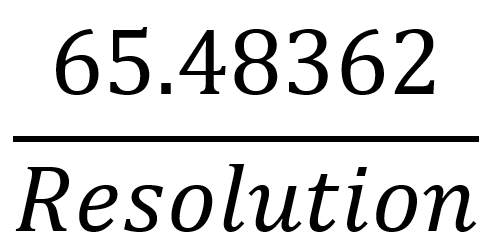
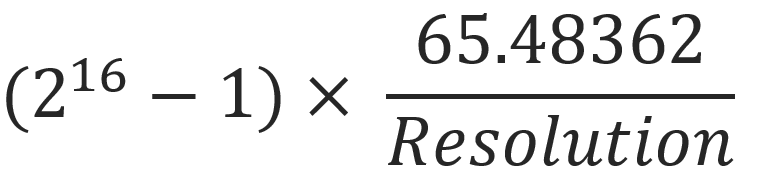
GetsSet or setsquery the acceleration, in Hz/s (steps per second per second).
Arguments
The acceleration in Hz/s.
|
[Default: |
5000] |
|
Minimum: |
Where resolution is the microstep resolution 8, 16, 32, 64, 128 or 256 |
|
Maximum: |
Where resolution is the microstep resolution 8, 16, 32, 64, 128 or 256 |
Returns
UserThe valueuser-defined AMAX (data 1) and the real value after the conversion (data 2). See user/real values.
Remarks
None.Notice that the maximum acceleration depends on the motor resolution. Therefore, when changing resolution, the SMD3 validates the acceleration value and may change it if necessary, to constrain it according to the above equation.
Examples
|
Tx: Rx: 0x0000,0x0000,1.5000E+02,1.4988E+02<CR><LF> Tx: AMAX<CR><LF> Rx: 0x0000,0x0000,1.5000E+02,1.4988E+02<CR><LF> |
// Set acceleration to 150Hz/s
// Note that the target value of 150 has been adjusted to the closest real value, which deviates from the requested value by 0.12 Hz/s |
MOTOR:DMAX - Deceleration
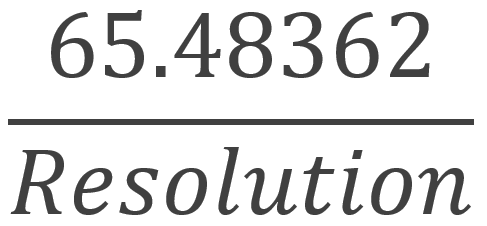
GetsSet or setsquery the deceleration, in Hz/s (steps per second per second).
Arguments
The deceleration in Hz/s.
Returns
UserThe valueuser-defined DMAX (data 1) and the real value after the conversion (data 2). See user/real values.
Remarks
None.Notice that the maximum deceleration depends on the motor resolution. Therefore, when changing resolution, the SMD3 validates the deceleration value and may change it if necessary, to constrain it according to the above equation.
Examples
|
Tx: Rx: 0x0000,0x0000,1.5000E+02,1.4988E+02<CR><LF> Tx: Rx: 0x0000,0x0000,1.5000E+02,1.4988E+02<CR><LF> |
// Set deceleration to 150Hz/s
// Query deceleration
|
MOTOR:VSTART – Start frequency
GetSet or setquery the start frequency in Hz. Must be set less than or equal to MOTOR:VSTOP. The acceleration ramp starts from this frequency.
The start frequency is the initial step rate, and helps to allow the motor to overcome inertia and start moving smoothly; if start frequency were zero, the duration of the initial few steps might be long enough that the motor would overcome inertia on the first step, then effectively stop for a time, then have to overcome inertia once more for the second step, and so on, until the steps were frequent enough that the motor remains moving.
Arguments
The start frequency in Hz.
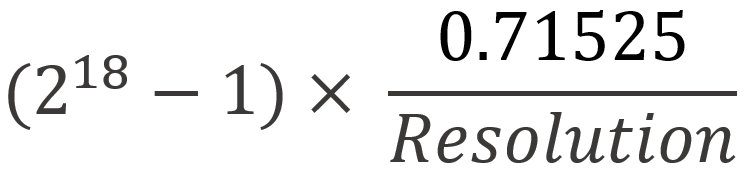
When resolution is 16, 32, 64, 128 or 256.
Returns
UserThe valueuser-defined VSTART (data 1) and the real value after the conversion (data 2). See user/real values.
Remarks
Start frequencyVSTART must be set equal to or less than stopVSTOP. frequency.This Ifis enforced by the SMD3; if a change to start frequencyVSTART makes it bigger than stopVSTOP, frequency, stop frequencyVSTOP is automatically adjusted to be equal to start frequency.VSTART.
Start frequencyVSTART must be set equal to or less than stepVMAX. frequency.The StartSMD3 frequency iswill not adjustedforce VSTART to match step frequencyVMAX if start frequencyVSTART is greater than step frequency.VMAX.
Examples
|
Tx: Rx: 0x0000,0x0000,0.0000+00,0.0000+00<CR><LF> Tx: Rx: 0x0000,0x0000,0.0000+00,0.0000+00<CR><LF> |
// Set
// Query VSTART |
MOTOR:VSTOP – Stop frequency
GetSet or setquery the stop frequency in Hz. Must be greater than or equal to MOTOR:VSTART. The deceleration ramp ends at this frequency. The final step before stop will occur at this frequency.
The stop frequency is the frequency at which the deceleration ramp ends; i.e. the deceleration ramp does not go from the target frequency linearly down to 0, but from the target frequency linearly down to the stop frequency.
Arguments
The stop frequency in Hz.
When resolution is 16, 32, 64, 128 or 256.
Returns
UserThe valueuser-defined VSTOP (data 1) and the real value after the conversion (data 2). See user/real values.
Remarks
Stop frequencyVSTOP must be set equal to or greater than startVSTART. frequency.This Ifis enforced by the SMD3; if a change to stop frequencyVSTOP makes it smaller than startVSTART, frequency, start frequencyVSTART is automatically adjusted to be equal to stop frequency.VSTOP.
Stop frequencyVSTOP must be set equal to or less than stepVMAX. frequency.The StopSMD3 frequency iswill not adjustedforce VSTOP to match step frequencyVMAX if stop frequencyVSTOP is greater than step frequency.VMAX.
Examples
|
Tx: Rx: 0x0000,0x0000,1.0000+01,9.9996+00<CR><LF> Tx: Rx: 0x0000,0x0000,1.0000+01,9.9996+00<CR><LF> |
// Set
// Query VSTOP |
MOTOR:VMAX – Step frequency
GetsSet or setsquery the target step frequencyfrequency, in Hz, or steps per second.Hz. This is the maximum speed the motor will be run at. The target frequency will only be reached if there is enough time or distance to do so; if moving for a short time, for example, the motor may only accelerate to some fraction of the target frequency before it is time to decelerate to a stop.
Arguments
The target frequency in Hz.
|
[Default: |
1 kHz] |
|
Minimum: |
1 Hz |
|
Maximum: |
15 kHz |
Returns
UserThe valueuser-defined VMAX (data 1) and the real value after the conversion (data 2). See user/real values.
Remarks
Motor torque decreases with speed, and each motor will have a different maximum frequency that it can achieve while reliably maintaining synchronicity (when synchronicity is lost, the motor fails to complete the steps that it is commanded to, leading to a difference between the true and actual positions), depending on the load it is driving.
Step frequencyVMAX must be set equal to or greater than start frequencyVSTART and stopVSTOP. frequency.The StepSMD3 frequency iswill not adjustedforce VMAX to match start frequencyVSTART and stop frequencyVSTOP if step frequencyVMAX is smaller than start frequencyVSTART and stop frequency.VSTOP.
Examples
|
Tx: Rx: 0x0000,0x0000,1.0000E+03,1.0000E+03<CR><LF> Tx: Rx: 0x0000,0x0000,1.0000E+03,1.0000E+03<CR><LF> |
// Set
// Query VMAX |
MOTOR:VACT – Actual frequency
GetQuery the live stepactual frequency of(the frequency at which the motor is currently spinning) in Hz (steps per second).
Returns
The frequency at which the motor is spinning in Hz.
Remarks
This value is derived from the stepper motor control logic;logic, there is no feedback from the motor itself. Hence, the motor could be stalled while whichVACT continues to indicate the expected.
Examples
|
Tx: Rx: 0x0000,0x0000,1.0000E+03<CR><LF> |
// Query state of blink |
MOTOR:PACT – Actual position
GetsSet or setsquery the actual position in steps.
The usual way to position the motor is to initialise the actual position to some reference value, usually 0, then adjust the target position to move the motor. In this way, by setting MOTOR:RUNA to 0 the motor can be homed to the initial 0 position. If you wish to perform relative movements, while still retaining an absolute reference, see MOTOR:PREL command.
Arguments
The target position in steps.
|
[Default: |
0]
Minimum:
-8388608223
Maximum:
8388607223-1
Returns
The absolute position, as above.
Remarks
Query is applicable any time, Set requires the motor in standby condition.
Examples
|
Tx: Rx: 0x0000,0x0000,1000.00<CR><LF> Tx: Rx: 0x0000,0x0000,0.00<CR><LF> |
// Query actual position
// Set actual position 0 |
MOTOR:PREL – Relative position
GetsSet or setsquery the relative position counter in steps.
Use this function to perform relative movement, while still retaining reference to absolute position via MOTOR:PACT. Set the desired value then use the MOTOR:RUNR command to initiate movement.
Arguments
The target position in steps.
|
[Default: |
0]
Minimum:
-8388608223
Maximum:
8388607223-1
Returns
The relative position, as above.
Remarks
Query is applicable any time. Set requires the motor be in standby condition.
Examples
|
Tx: Rx: 0x0000,0x0000,1000.00<CR><LF> Tx: Rx: 0x0000,0x0000,0.00<CR><LF> |
// Query relative position
// Set relative position 0 |
TZW – Zero wait time
GetsSet or setsquery the waiting time after ramping down to a stop before the next movement or direction inversion can start. Can be used to avoid excess acceleration, e.g. from MOTOR:VSTOP to MOTOR:VSTART.
When using higher values for the start and stop frequency, a subsequent move in the opposite direction would result in a jerk equal to start frequencyVSTART + stop frequency.VSTOP. The motor may not be able to follow this. Zero wait timeTZW can be used to introduce a short delay between the two and eliminate the jerk.
Arguments
The waiting time in seconds.milliseconds.
|
[Default: |
0] |
|
Minimum: |
0 |
|
Maximum: |
|
Returns
The zero wait time, as above.
Examples
|
Tx: Rx: 0x0000,0x0000,1.0000E+02<CR><LF> Tx: Rx: 0x0000,0x0000,1.0000E+02<CR><LF> |
// Set TZW to 100 ms
// Query TZW |
MOTOR:THIGH – Microstep transition
GetsSet or setsquery the full step / microstepping transition. When frequency falls below this threshold (approximately), the motor switches from full step to the selected microstep resolution. The productSMD3 determines the upper threshold automatically and applies hysteresis to avoid possible jitter between the two stepping modes. The upper threshold cannot be adjusted.
Arguments
Threshold in frequency Hz.
|
[Default: |
10000 Hz] |
|
Minimum: |
1 Hz |
|
Maximum: |
15000 Hz |
Returns
UserThe valueuser-defined THIGH (data 1) and the real value after the conversion (data 2). See user/real values.
Remarks
AMLThe Device controlSMD3 software calculates and displays the upper threshold value for reference, although as noted above it cannot be adjusted.
Examples
|
Tx: Rx: 0x0000,0x0000,5.0000E+02,5.0400E+02<CR><LF> Tx: Rx: 0x0000,0x0000,5.0000E+02,5.0400E+02<CR><LF> |
// Set THIGH threshold to 500 Hz
// Query THIGH |
Step/Direction
MOTOR:EDGE – Edge to step on
GetsSet or setsquery whicha edge(s)value indicating whether a step occurs on whenboth inthe rising and falling edges of the step directioninput, mode.or just the rising edge.
Arguments
Edge(s)Step toon stepboth on.edges.
[0:
Rising edge only]only; a step occurs only on the rising edge]
1:
Both;Botha step occurs on both rising and falling edges
Returns
Edge(s)True if step input is configured to step on.on both rising and falling edges, as above.
Remarks
UseEnabling optionthis forfeature both edges to halvehalves the frequencyclock on the step inputrate required to obtainachieve a givenchosen step rate. The EDGE command is disabled in any other modes than step/direction mode.
Examples
|
Tx: Rx: 0x0000,0x0000,1<CR><LF> Tx: Rx: 0x0000,0x0000,1<CR><LF> |
// Set
// Query EDGE |
MOTOR:INTERP – Step interpolation
GetsSet or setsquery a value indicating whether the step input should be interpolated to 256 microsteps. Applicable in Mode.StepDir mode only.
Arguments
Enable interpolation of step input to 256 microsteps.
|
[0: |
Normal; each step input will cause one step at the current resolution] |
|
1: |
Interpolate; each step input will be interpolated to 256 microsteps. |
Returns
True if interpolation mode is active, as above.
Remarks
The INTERP command is useful in step/direction mode. Enabling this feature affords the benefits of high-resolution microstepping, without the drawback of very high step clock rates. Internal logic tracks the rate at which steps are supplied and smooths them out into 256 microsteps; e.g. if resolution is set to full-step and see <edge to step on> is set to rising, then each rising edge on the step input generates a series of 256 microsteps at the motor.microsteps.
Examples
|
Tx: Rx: 0x0000,0x0000,1<CR><LF> Tx: Rx: 0x0000,0x0000,1<CR><LF> |
//
// Query INTERP |
Bake
BAKE:TBAKET – Bake temperature setpoint
GetsSet or setsquery the bake temperature setpoint. To run bake, select bake mode using the MODE, then start bake using the run bake command.RUNB. Use stop commandSTOP to end bake.
Arguments
Bake temperature setpoint.
|
[Default: |
150 °C] |
|
Minimum: |
0 °C |
|
Maximum: |
200 °C |
Returns
Bake temperature setpoint in °C, as above.
Examples
|
Tx: Rx: 0x0000,0x0000,100<CR><LF> Tx: Rx: 0x0000,0x0000,100<CR><LF> |
// Set bake setpoint to 100 °C
// Query |
BAKE:RUN – Start bake
Start bake. Configure the bake temperature setpoint using BakeTemperature.
Command:
BAKE:RUN<CR><LF>
Examples
Tx: BAKE:RUN<CR><LF>
Rx: 0x0000,0x0000<CR><LF>
// Run bake
BAKE:ELAPSED – Elapsed bake time
Gets the elapsed bake time.
Command:
BAKE:ELAPSED<CR><LF>
Returns
Elapsed time in format h:m:s where h is hours, m is minutes and s seconds.
Examples
Tx: BAKE:ELAPSED<CR><LF>
Rx: 0x0000,0x0000,2:34:12<CR><LF>
// Bake has run for 2 hours 34 minutes and 12 seconds
Boost
BOOST:EN – Boost enable
Gets or sets a value indicating whether the boost supply should be enabled. The boost supply steps up the input voltage from 48 V to 67 V to maximise motor dynamic performance. Enable for best performance. Regardless of this setting, the boost supply is disabled when input voltage falls below 48 V, or the boost enable jumper is not fitted.
Command:
BOOST:EN,State<CR><LF>
Query:
BOOST:EN <CR><LF>
Arguments
State
BOOL
Enable the boost circuit.
0:
Disable boost
[1:
Enable boost]
Returns
Enable state.
Examples
Tx: BOOST:EN,1<CR><LF>
Rx: 0x0000,0x0000,1<CR><LF>
Tx: BOOST:EN<CR><LF>
Rx: 0x0000,0x0000,1<CR><LF>
// Enable boost
// Query
Coms: Ethernet
COMS:NET:DHCP – DHCP
Gets or sets a value indicating whether DHCP is enabled. If enabled, DHCP (Dynamic Host Configuration Protocol) will be used to automatically assign network configuration, such as IP address and gateway, to the device.
Command:
COMS:NET:DHCP,State<CR><LF>
Query:
COMS:NET:DHCP<CR><LF>
Arguments
State
BOOL
DHCP enable state
0:
Disable DHCP
[1:
Enable DHCP]
Returns
Enable state
BOOL
Examples
Tx: COMS:NET:DHCP,1<CR><LF>
Rx: 0x0000,0x0000,1<CR><LF>
Tx: COMS:NET:DHCP<CR><LF>
Rx: 0x0000,0x0000,1<CR><LF>
// Enable DHCP
// Query
COMS:NET:GATEWAY – Gateway
Gets or sets the gateway address. When DHCP is enabled, the value read back will be the value assigned by DHCP rather than any value you might have set. Any value set however is retained, and will apply if DHCP is disabled at a later time.
Command:
COMS:NET:GATEWAY,Address<CR><LF>
Query:
COMS:NET:GATEWAY<CR><LF>
Arguments
Address
DOTTED DECIMAL
Returns
Address
DOTTED DECIMAL
Examples
Tx: COMS:NET:DHCP<CR><LF>
Rx: 0x0000,0x0000,1<CR><LF>
Tx: COMS:NET:GATEWAY,192.168.1.1<CR><LF>
Rx: 0x0000,0x0000,10.0.96.1<CR><LF>
// Query DHCP state
// DHCP is on
// Set the gateway
// DHCP is on, and has assigned the gateway so the returned value does not match what we set
COMS:NET:NETMASK – Subnet mask
Gets or sets the subnet mask. When DHCP is enabled, the value read back will be the value assigned by DHCP rather than any value you might have set. Any value set however is retained, and will apply if DHCP is disabled at a later time.
Command:
COMS:NET:NETMASK,Mask<CR><LF>
Query:
COMS:NET:NETMASK<CR><LF>
Arguments
Mask
DOTTED DECIMAL
Returns
Mask
DOTTED DECIMAL
Examples
Tx: COMS:NET:NETMASK<CR><LF>
Rx: 0x0000,0x0000,255.255.248.0<CR><LF>
// Query
COMS:NET:IP – IP Address
Gets or sets the IP address. When DHCP is enabled, the value read back will be the value assigned by DHCP rather than any value you might have set. Any value set however is retained, and will apply if DHCP is disabled at a later time.
Command:
COMS:NET:IP,Address<CR><LF>
Query:
COMS:NET:IP<CR><LF>
Arguments
Address
DOTTED DECIMAL
Returns
Address
DOTTED DECIMAL
Examples
Tx: COMS:NET:IP<CR><LF>
Rx: 0x0000,0x0000,10.0.97.70<CR><LF>
// Query the IP address
COMS:NET:IPCONF – Get network config summary
Outputs a summary of network configuration in human readable form.
Query:
COMS:NET:IPCONF<CR><LF>
Returns
Network config summary
See example below.
Examples
Tx: COMS:NET:IPCONF<CR><LF>
Rx: 0x0000,0x0000,<CR><LF>
Ethernet interface:<CR><LF>
IPv4 Address. . . . . . . . . . . :10.0.97.70<CR><LF>
Subnet Mask . . . . . . . . . . .:255.255.248.0<CR><LF>
Default Gateway . . . . . . . :10.0.96.1<CR><LF>
DHCP State. . . . . . . . . . . . :Enabled<CR><LF>
COMS:NET:LINK – Get link up status
Gets a value indicating whether the ethernet interface link is up. This will read back as false when the LAN connector is unplugged for example.
Query:
COMS:NET:LINK<CR><LF>
Returns
Link up state
BOOL
Examples
Tx: COMS:NET:LINK<CR><LF>
Rx: 0x0000,0x0000,1<CR><LF>
// Query
// Link is up
COMS:NET:MAC – Get MAC address
Gets the Ethernet interface MAC address.
Query:
COMS:NET:MAC<CR><LF>
Returns
MAC address
MAC
Examples
Tx: COMS:NET:MAC<CR><LF>
Rx: 0x0000,0x0000,44:b7:d0:c7:16:75<CR><LF>
// Query
Coms: Serial
COMS:SERIAL:BAUD – Baud rate
Gets or sets the baud rate.
Command:
COMS:SERIAL:BAUD,Baud<CR><LF>
Query:
COMS:SERIAL:BAUD<CR><LF>
Arguments
Baud
UINT
Baud rate
4800960014400192003840057600[115200]230400460800921600
Returns
Baud rate
UINT
Examples
Tx: COMS:SERIAL:BAUD,9600<CR><LF>
Rx: 0x0000,0x0000,9600<CR><LF>
Tx: COMS:SERIAL:BAUD<CR><LF>
Rx: 0x0000,0x0000,9600<CR><LF>
// Set 9600 baud
// Query
COMS:SERIAL:MODE – RS232/RS485 mode selection
Gets or sets the serial coms mode, either RS232 or RS485. Unplug from the host device before changing the mode.
Command:
COMS:SERIAL:MODE,Mode<CR><LF>
Query:
COMS:SERIAL:MODE<CR><LF>
Arguments
Mode
ENUM
Serial interface mode
0:
RS232
[1:
RS485]
Returns
Mode
ENUM
Examples
Tx: COMS:SERIAL:MODE,1<CR><LF>
Rx: 0x0000,0x0000,1<CR><LF>
Tx: COMS:SERIAL:MODE<CR><LF>
Rx: 0x0000,0x0000,1<CR><LF>
// Set RS485 mode
// Query
COMS:SERIAL:RS485DEL – Turnaround delay
Gets or sets a value in milliseconds specifying the delay to execute between receipt of a command from the host and the client (SMD4) sending the response. Applicable to RS485 mode only.
The RS485 interface is half duplex (it can send or receive data, but cannot do both at once) and so by default is in the receive state. The interface switches to transmit mode when a command has been received, executed and a response is ready to send. The turnaround delay is used to insert an additional delay following execution of the command but preceding switching to transmit, to allow the host more time to switch into receive mode.
Experiment with increasing this setting if you find that host receives a response with a portion missing from the start of the response, for example missing some or all of the status an error flags.
Command:
COMS:SERIAL:RS485DEL,Delay<CR><LF>
Query:
COMS:SERIAL:RS485DEL<CR><LF>
Arguments
Delay
UINT
Delay in ms.
Default:
0
Minimum:
0
Maximum:
1000
Returns
Delay in ms
UINT
Examples
Tx: COMS:SERIAL:RS485DEL,10<CR><LF>
Rx: 0x0000,0x0000,1<CR><LF>
Tx: COMS:SERIAL:RS485DEL<CR><LF>
Rx: 0x0000,0x0000,10<CR><LF>
// Set delay of 10 ms
// Query
COMS:SERIAL:TERM – Termination
Gets or sets a value indicating whether RS485 line termination should be used. If enabled, a 120 termination resistance is placed between the RS485 A and B pins. See <section on termination>.
Command:
COMS:SERIAL:TERM,State<CR><LF>
Query:
COMS:SERIAL:TERM<CR><LF>
Arguments
State
BOOL
Termination enable state
[0:
Disabled]
1:
Enabled
Returns
Enable state
BOOL
Examples
Tx: COMS:SERIAL:TERM,0<CR><LF>
Rx: 0x0000,0x0000,0<CR><LF>
Tx: COMS:SERIAL:TERM<CR><LF>
Rx: 0x0000,0x0000,0<CR><LF>
// Disable termination
// Query
COMS:SERIAL:SLAVEADDR – Slave address
Gets or sets the slave address. Only applicable when addressing mode is used, see <section at top here detailing addressing>
Command:
COMS:SERIAL:SLAVEADDR,Address<CR><LF>
Query:
COMS:SERIAL:SLAVEADDR<CR><LF>
Arguments
Address
UINT
Termination enable state
Minimum:
1
Maximum:
247
Returns
Address
UINT
Examples
Tx: COMS:SERIAL:SLAVEADDR,1<CR><LF>
Rx: 0x0000,0x0000,1<CR><LF>
Tx: COMS:SERIAL:SLAVEADDR<CR><LF>
Rx: 0x0000,0x0000,1<CR><LF>
// Disable termination
// QueryBAKET